
- Home
- Product
- Load Board
Load Board
Every load, for every carrier, on one board.
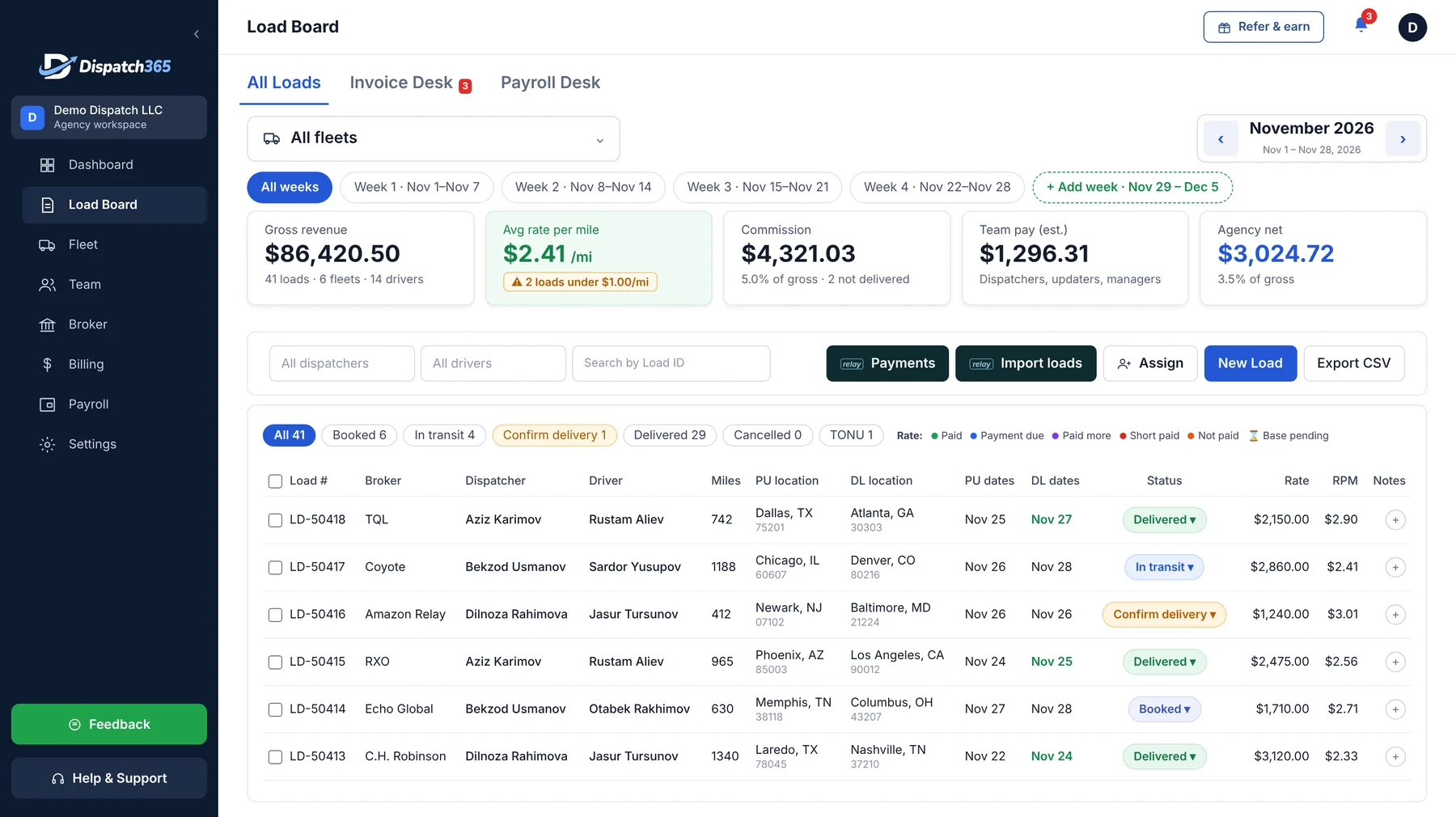
The Load Board is where a dispatch service runs its day. Every load for every truck company, from booked to delivered, with the money for your role right on top.
What you get
Built around how a dispatch service works.
Every carrier on one board
All loads for all your truck companies in one table: broker, dispatcher, driver, miles, pickup and drop-off, dates, status, rate and rate per mile.
The numbers that matter to you
Cards on top show gross, average rate per mile, commission, team pay and agency net. Dispatchers see their own gross and pay instead.
Billing weeks and months
Switch months and weeks (Sunday to Saturday). Every load falls into one billing week, so invoices and pay always line up.
No duplicate loads
Load numbers are unique per truck company. A duplicate is blocked when you save.
Load Activity
Status changes, date and address edits, stops, charges, billing-week moves and receipts are logged with who did it and the note they left.
Documents on the load
Attach the rate con, POD and other files. Missing rate cons and PODs are flagged on the status tracker.
Charges and deductions
Add lumper, detention, layover and other charges, or record a deduction charged to the agency or a dispatcher, with an optional receipt.
TONU handled properly
Mark a load TONU with its own rate and date, and choose whether it earns commission and team pay.
Driver documents
Upload a CDL or medical card and the fields fill in. An expired document is flagged when the driver is put on a load.
FAQ
Load Board: common questions
What statuses can a load have?
Booked, In transit and Delivered, then Invoiced and Paid. A load can also end as Cancelled or TONU. A load whose delivery date has passed but isn't marked delivered shows as Confirm delivery.
Can dispatchers edit each other's loads?
No. Dispatchers and updaters can open any load in the agency to look at it, but only edit their own. Admins can edit any load, and managers can edit the loads of the truck companies they manage.
What happens to a load once it's invoiced?
A load on a sent invoice becomes view-only for everyone. Changes go through the invoice, so your billing and pay records stay consistent.
Can I export my loads?
Yes. Export CSV on the Load Board gives you the loads in view.
More in Dispatch365
Invoicing
Weekly invoices to truck companies from the same loads.
Learn more →Dispatcher pay
Commission saved on every load, pay you can trust.
Learn more →Amazon Relay import
Bring Relay loads in and check them against pay statements.
Learn more →Team & roles
Admins, managers, dispatchers and updaters, each with the right view.
Learn more →Move your dispatch service off spreadsheets.
Start a 30-day free trial with every feature. No card required, and you can invite your whole team.