
Software for truck dispatch services
The software truck dispatch services run on.
Book loads for many carriers, invoice truck companies and pay your dispatchers from the same load records. From one independent dispatcher to a full agency.
- 30-day free trial
- No card required
- Not a TMS
Run on Dispatch365 in 2026
- $4M+in freight booked
- 3,300+loads
- 20truck companies
- 190+drivers
- 15+dispatchers and staff
Totals across all accounts, as of November 28, 2026.
Product tour
Google Sheets vs Dispatch365, in under a minute.
Rate cons that fill the load, FMCSA search for carriers and brokers, and Amazon Relay trips and pay statements, side by side with the spreadsheet way.
Get a live walkthroughWhy switch
Spreadsheets weren't built to run a dispatch business.
A dispatch service lives on commission. When loads, invoices and pay sit in different files, the money leaks in small ways every week.
On spreadsheets
- The same load number gets billed twice
- A rate changes after the fact and nobody agrees on the split
- Billing periods are rebuilt by hand, every week
- Everyone can see everyone's earnings, or nobody sees anything
- Two people edit the same file and overwrite each other
On Dispatch365
- Load numbers are unique per truck company, so duplicates are blocked on save
- The commission split is saved on each load, and closed months never change
- Pick a week, review, invoice. Invoiced loads lock automatically
- Each dispatcher sees only their own pay
- Invoices and dispatcher pay come from the same load numbers
How it works
From booked load to paid dispatcher, one straight line.
- 01
Book the load
Add the truck company, broker, driver, rate and miles, and attach the rate con. The commission split is saved on the load, and duplicate load numbers are blocked.
- 02
Move it to delivered
Booked, In transit, Delivered. Dispatchers update their own loads, and missing rate cons or PODs are flagged on the load.
- 03
Invoice the truck company
The Invoice Desk lists what each truck company owes, week by week. Review, add fees or credits, and send. Invoiced loads lock.
- 04
Pay your team
Each dispatcher's pay is already worked out from their delivered loads. Monthly statements come from the same numbers as the invoices.
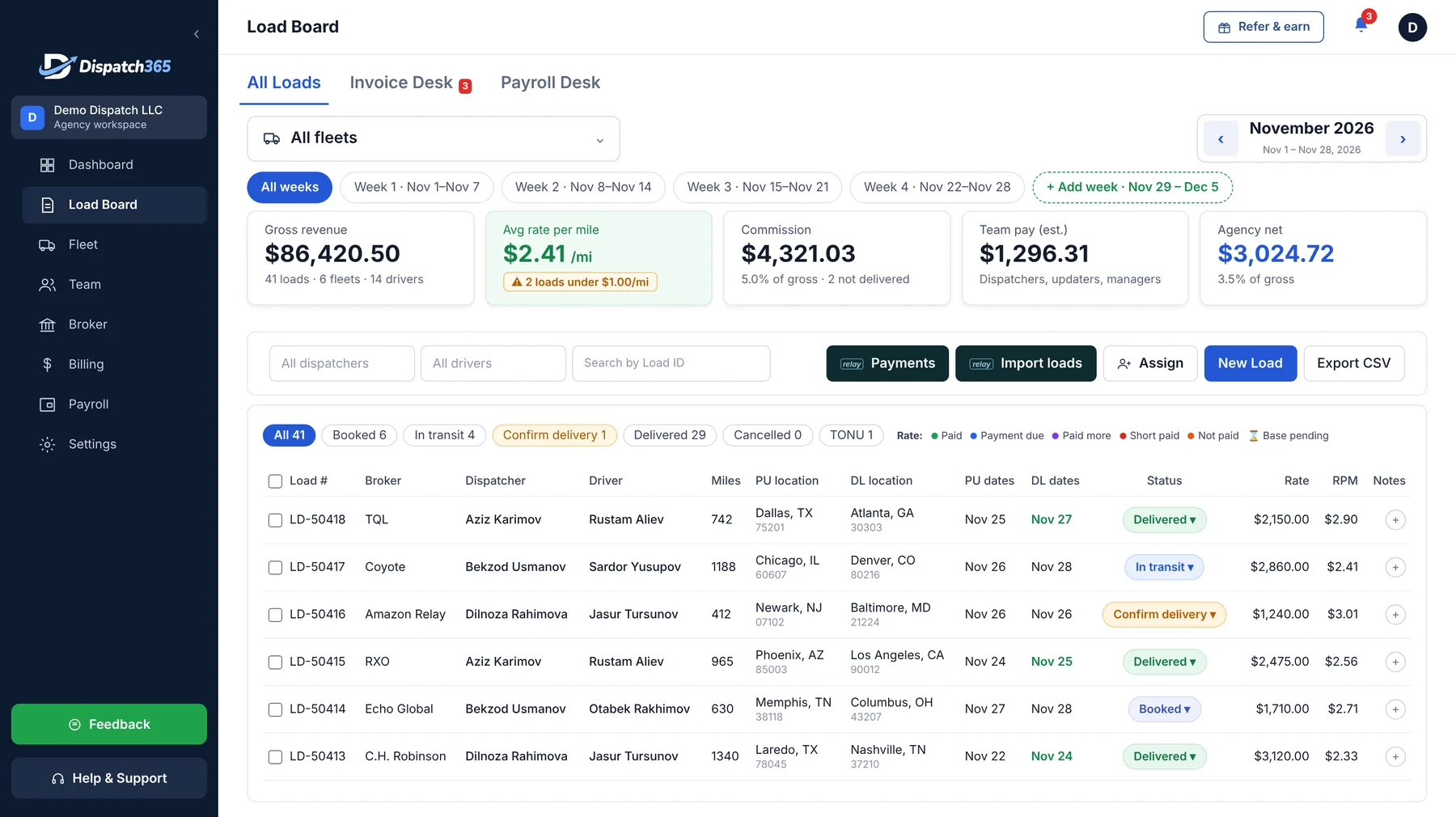
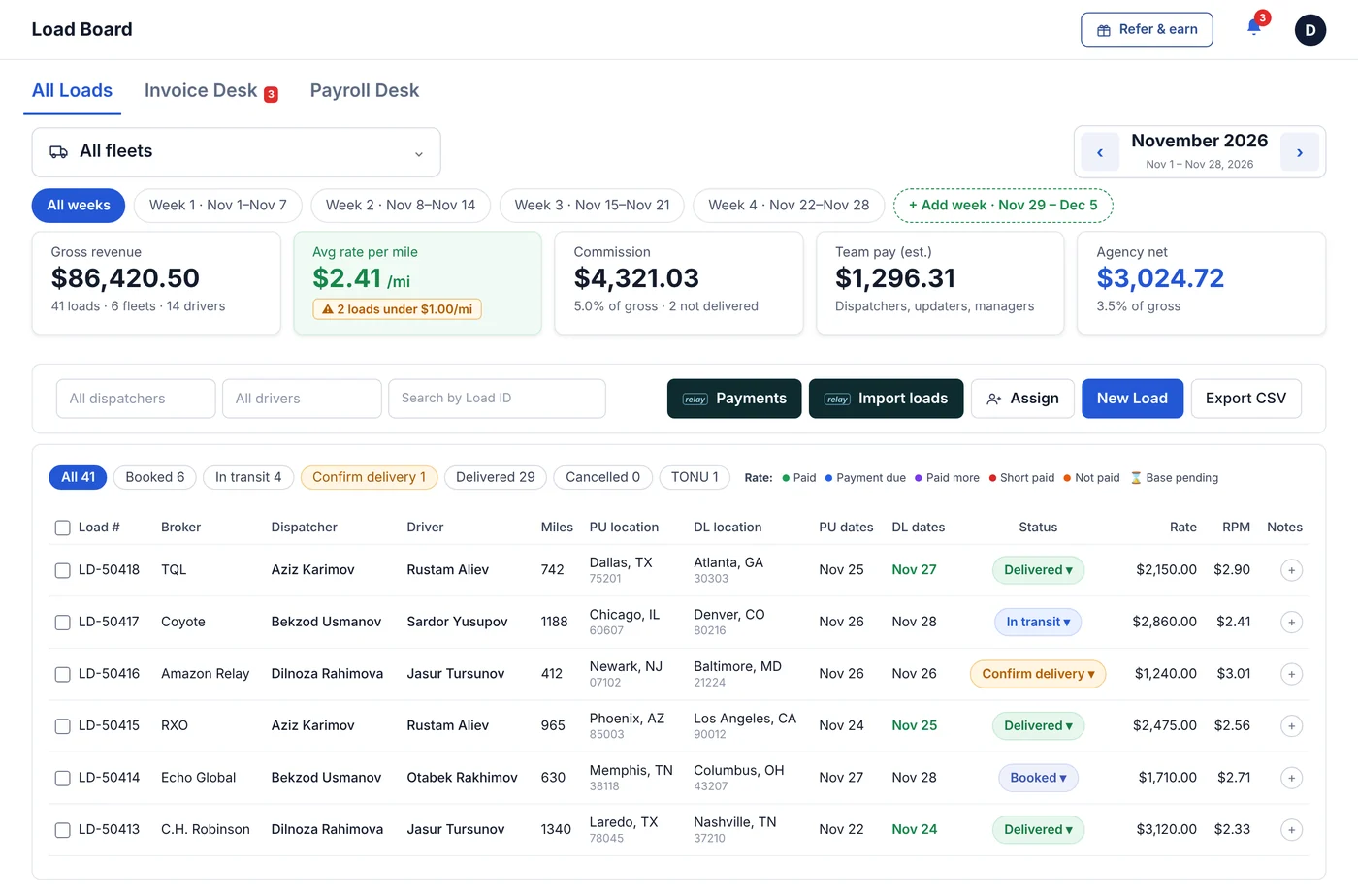
Load Board
Every load, for every carrier, on one board.
See what's booked, in transit and delivered across all your truck companies, with the money that matters to your role right on top.
- Status at a glance. Booked, In transit, Confirm delivery, Delivered, Cancelled and TONU, with counts.
- Rate per mile flags. Low-paying loads stand out before they cost you.
- Weeks and months built in. Filter to any billing week, carrier, dispatcher or driver.
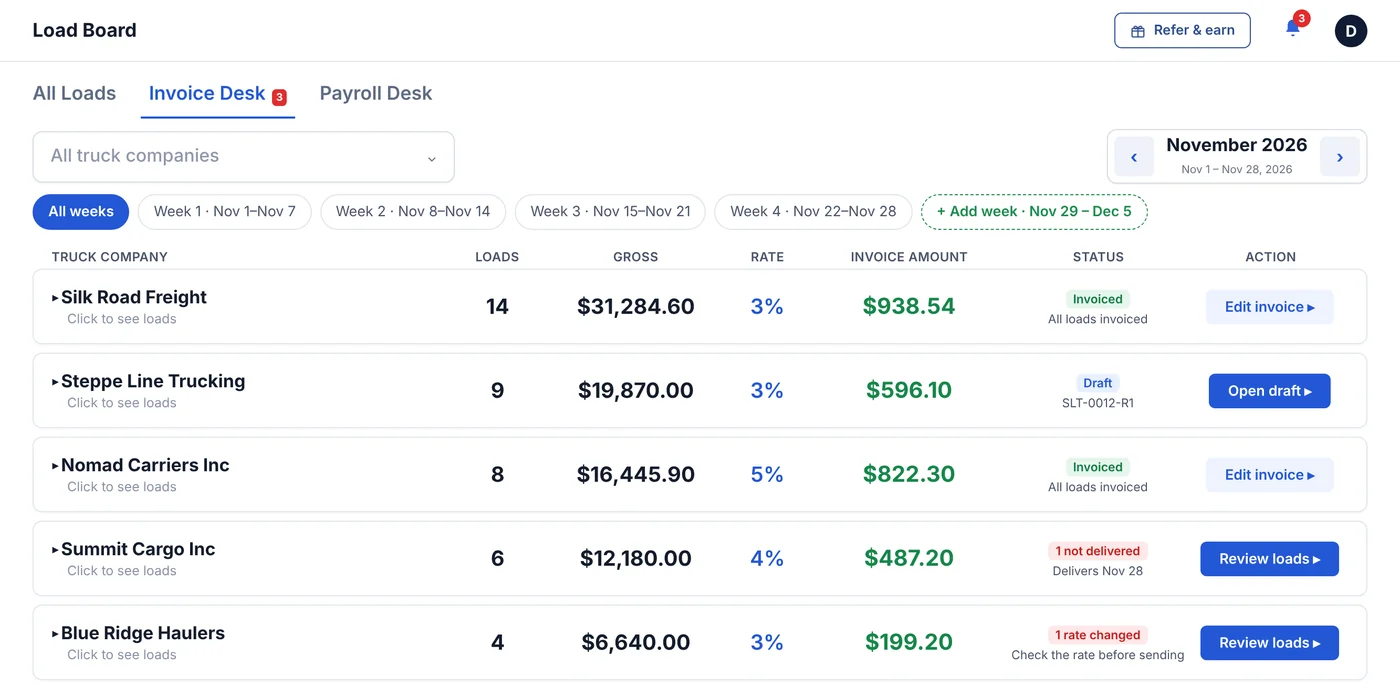
Invoicing
Invoice each truck company in a few clicks.
The Invoice Desk shows what every truck company owes for the week or month, and what still needs a look before you send.
- Ready-to-bill totals. Loads, gross, your rate and the invoice amount per truck company.
- Warnings first. Loads not delivered yet or rates that changed are flagged before you send.
- Send with the details. Email the invoice with a CSV of its loads, and add fees, discounts or credits.
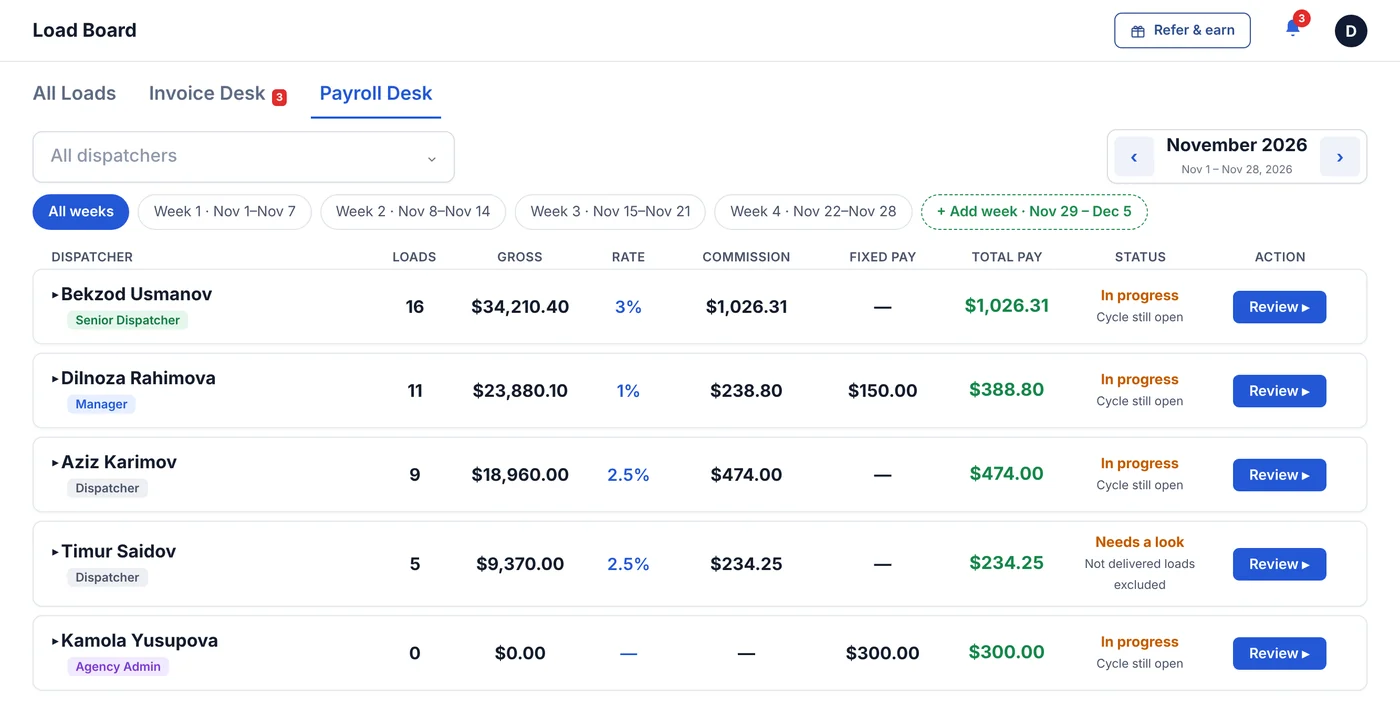
Dispatcher pay
Pay your dispatchers from the same numbers.
Commission is saved on every load when it's booked. The Payroll Desk adds it up per person, with fixed pay, so there's nothing to reconcile.
- Per-person totals. Loads, gross, rate, commission, fixed pay and total pay.
- Only earned loads count. Loads that aren't delivered yet are left out and flagged.
- Statements by month. A PDF statement per person, and My earnings for each dispatcher.
Also inside
Everything a dispatch service runs on.
Amazon Relay import
Upload the Relay export to bring trips in, then check what Amazon paid against what you expected.
Roles that fit a dispatch team
Admin, Manager, Dispatcher and Updater. Dispatchers see their own pay, never everyone else's.
Load Activity
Every status change, date change, charge and billing-week move is logged with who did it and why.
Billing weeks and closed months
Loads fall into Sunday-to-Saturday billing weeks. Once a month closes, its invoices and pay stay as they were.
Driver documents
Upload a CDL or medical card and the fields fill in. Expired documents are flagged when the driver goes on a load.
Dashboard
Gross, commission, team pay and agency net for any period, with loads by status, broker and truck company.
Dispatch service or truck company?
A TMS runs trucks. Dispatch365 runs a dispatch service.
Most "dispatch software" is a TMS for carriers. If you dispatch for other people's trucks and earn a commission, you need different tools.
| Dispatch365 | A typical TMS | |
|---|---|---|
| Built for | Dispatch services and independent dispatchers | Truck companies and fleets |
| Works for | Many truck companies at once | One company's own trucks |
| Daily work | Booking loads, updates, invoices to carriers | Trucks, drivers, maintenance, IFTA |
| How you earn | Commission on each load, per truck company | Freight revenue |
| Payroll | Dispatcher commission and fixed pay | Driver settlements |
Your truck companies already have a TMS? They can keep it. Read the full comparison.
Start solo, grow into an agency
One price per seat. Add people when you grow.
Sign up as the Admin and dispatch on your own. When you hire, add managers, dispatchers and updaters from Team. Every seat gets the full product.
- AdminRequired, one per account
$59.99/mo
- ManagerOperations
$39.99/mo
- Senior DispatcherDispatch
$19.99/mo
- Junior Dispatcher / UpdaterUpdates
$9.99/mo
FAQ
Questions dispatchers ask
What is Dispatch365?
Dispatch365 is software for truck dispatch services, from one independent dispatcher to a full agency. You book loads for many truck companies, invoice those truck companies and pay your dispatchers from the same load records.
Is Dispatch365 a TMS?
No. A TMS is built for a truck company running its own trucks. Dispatch365 is built for the dispatch service side: the people who find loads and handle paperwork for many carriers and earn a commission on each load. Your truck companies can keep their TMS.
How is it different from a spreadsheet?
Each load is saved once, with its commission split. Invoices, dispatcher pay and reports all read from those same loads, so nothing is retyped and past months stay the same after they close. Duplicate load numbers are blocked, and every person sees only what their role allows.
How much does it cost?
You pay per seat, per month, only for the people who use it: Admin $59.99, Manager $39.99, Senior Dispatcher $19.99, Junior Dispatcher / updater $9.99. A solo dispatcher pays for the Admin seat only. Every seat gets the full product.
Is there a free trial?
Yes. You get 30 days with every feature and no card required. You can invite your whole team during the trial.
Does it work with Amazon Relay?
Yes. Upload your Relay export to bring trips in as loads, then record what Amazon paid per trip (base, fuel, tolls, detention, TONU) and compare it with what you expected.
What is the Founding Partner offer?
The first 10 founding partners get 50% off every seat for as long as they stay subscribed. Create your account first, then apply from Settings → Subscription.
Move your dispatch service off spreadsheets.
Start a 30-day free trial with every feature. No card required, and you can invite your whole team.